Beautiful LaTeX Documents,
No Expertise Required
Write publication-ready papers, theses, and reports without learning LaTeX syntax. Pick your content — equations, theorems, tables, figures — and Lilia handles the formatting. Export to PDF, LaTeX, DOCX, and more when you're ready.
From First Draft to Publication
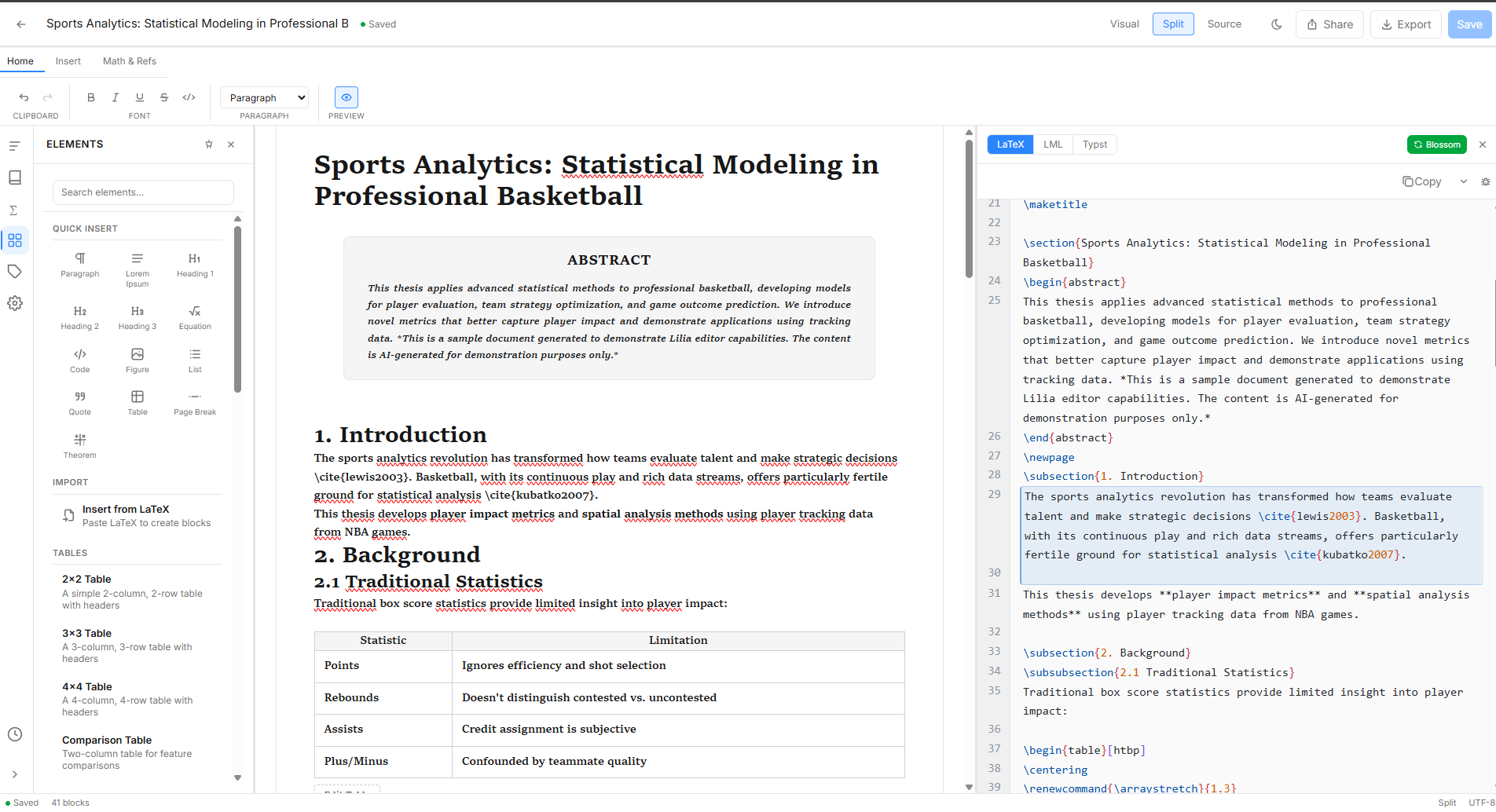
Write your document visually, let Lilia generate the LaTeX. Add equations, citations, and figures without touching a single command. Collaborate in real time and export to any format when you're ready.
No LaTeX Expertise Needed. Just pick what you need — equations, theorems, code, tables — and start writing
You don't need to memorize LaTeX commands. Type / to insert any content type: equations render instantly, theorems get proper numbering, code gets syntax highlighting. Write visually on the left, see the LaTeX output on the right. When you're done, export a publication-ready document.
Write LaTeX equations with KaTeX rendering, multiple modes (inline, display, align, gather), and cross-referenceable labels.
8 theorem environments — theorem, definition, lemma, corollary, proposition, remark, example, and proof.
Syntax-highlighted code blocks supporting 27+ languages including Python, JavaScript, Rust, LaTeX, SQL, and more.
Full spreadsheet-like tables with headers, and figure blocks with captions, alt text, and image upload.
Auto-generated bibliography and table of contents blocks that update as you write.
Type / to insert any block type instantly. Filter and search blocks without leaving your keyboard.
Import & Export. 7 export formats, 5 import formats — write once, publish anywhere
Import existing documents from DOCX, LaTeX, or Markdown. Export to PDF, LaTeX, DOCX, HTML, Markdown, Typst, or LML. Multi-file LaTeX export is Overleaf-compatible.
Export publication-ready PDFs directly from the editor with proper page layout, headers, and numbering.
Single-file or multi-file ZIP export, fully compatible with Overleaf and standard TeX distributions.
Import Word documents with a confidence-scored review workflow — approve, edit, or reject each block before finalizing.
Export to standard Markdown for GitHub or static sites, or standalone HTML with embedded images.
Export to Typst — the modern alternative to LaTeX with faster compilation and cleaner syntax.
Lilia Markup Language — a clean, open-spec format that preserves every block type and attribute.
AI Writing Assistant. Generate, improve, and check your writing with AI
Built-in AI assistant that understands academic writing. Generate content, improve your prose, create LaTeX equations from descriptions, and catch grammar issues — all without leaving the editor.
Generate new paragraphs, sections, or entire blocks from a prompt. The AI understands your document's context.
Improve, paraphrase, expand, or shorten selected text. Polish your writing with a single shortcut.
Describe a mathematical concept in plain English and get properly formatted LaTeX equations.
Real-time grammar, clarity, style, and passive voice detection with inline suggestions.
Automatically generate a concise abstract from your full document content.
Verify citation consistency and formatting across your entire document.
Bibliography & Citations. DOI, ISBN, and arXiv lookup with 6 citation styles
Manage references with automatic metadata lookup. Import BibTeX files, look up entries by DOI, ISBN, or arXiv ID, and format your bibliography in APA, MLA, Chicago, IEEE, Harvard, or Vancouver.
Enter a DOI, ISBN, or arXiv ID and get complete citation metadata filled in automatically.
Import existing .bib files or export your bibliography as BibTeX for use in other tools.
Format citations in APA, MLA, Chicago, IEEE, Harvard, or Vancouver with one click.
Formula Library. Build and manage your LaTeX formula collection
Browse categorized formulas, create your own with the built-in code editor, and copy LaTeX to clipboard for Overleaf or any LaTeX workflow. Save frequently used equations for quick reuse.
Write and edit LaTeX formulas with full syntax highlighting and live KaTeX preview.
Copy any formula's LaTeX code to your clipboard with a single click. Ready for Overleaf.
Organize formulas by category, mark favorites, and track your most-used equations.
Collaboration. Share documents and work together in real time
Invite collaborators by email, share documents with public links, and see who's viewing your document in real time. Role-based access controls let you manage editors, reviewers, and viewers.
See who's currently viewing or editing your document with live avatar indicators.
Invite collaborators as editors, reviewers, or viewers. Control who can modify your document.
Generate a public share link for read-only access. Disable it anytime.
Editor Experience. Keyboard-driven workflow with live preview and sidebar panels
A professional editing experience with side-by-side preview, document outline, version history, cross-reference labels, and full keyboard shortcut support. Everything you need in one view.
Side-by-side preview with scroll sync. See your formatted document update as you type in LML, LaTeX, or Typst.
Navigate your document structure with a heading hierarchy panel. Jump to any section instantly.
Create named snapshots, browse your document's history, and restore any previous version.
Label equations, figures, tables, sections, and theorems. Insert cross-references that update automatically.
Full keyboard-driven workflow — Ctrl+K for AI, Ctrl+/ for shortcuts, / for slash commands, and more.
Start from pre-built templates for tables, figures, equations, code blocks, and theorem structures.
Start free with full editing. Upgrade for formula library, document conversion, or collaboration.
Express
Core editing features for personal use
LaTeX Lab
Formula library for LaTeX & Overleaf users
Converter
One-time purchase for document conversion
Pro
Full power with collaboration and all features
Frequently asked questions
Do you have any questions? We have got you covered.
Get early access
Be among the first to get access to Lilia Editor updates and features.